

Administrator Multi-Session 🔎📈
To add a second administrator account and enable multi-session access on Munily, follow these steps:
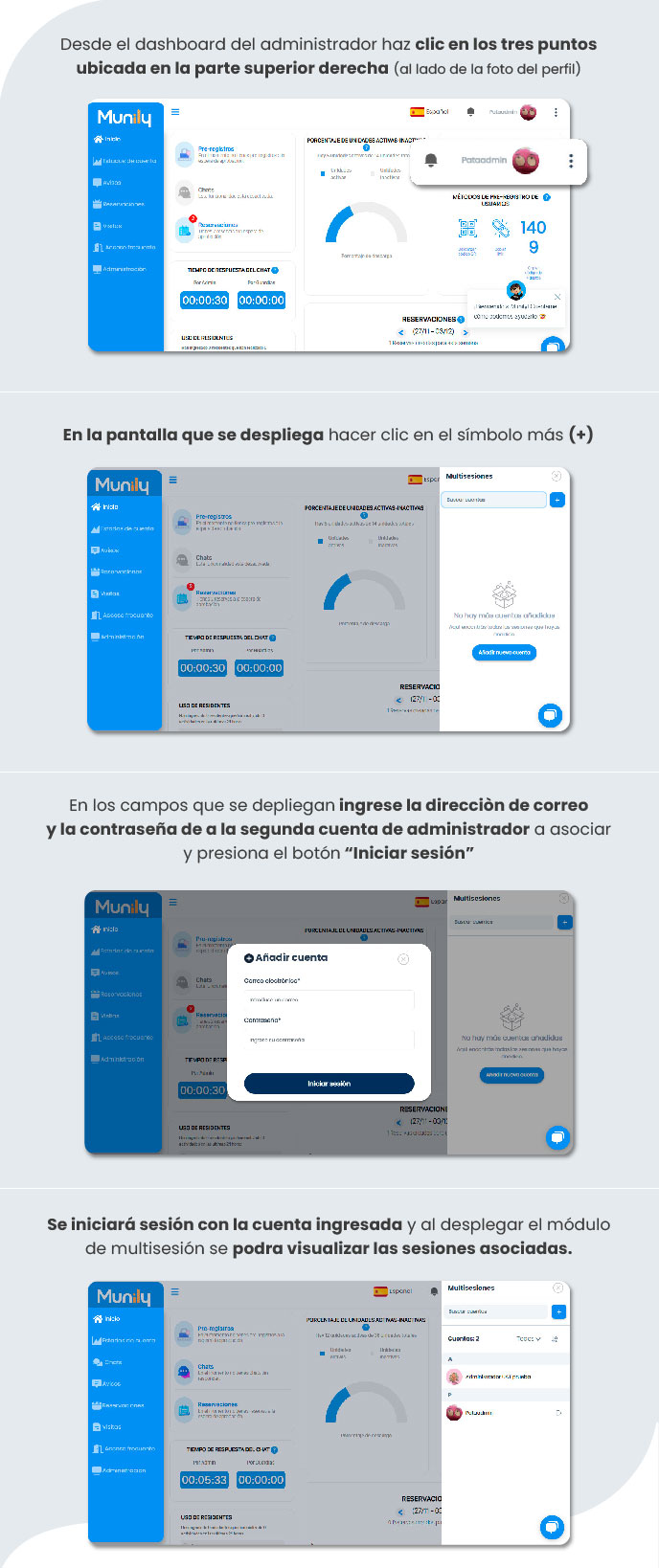
Go to the Administrator Dashboard: From the main screen of your administrator account, locate the three vertical dots in the upper-right corner of the screen, right next to your profile picture. Click on them.
Open the multi-session Module: Clicking the three dots will open a menu. On the screen that appears, locate and click the plus sign (+) to add a new session.
Enter the Second Account’s Credentials: A form for adding an account will appear. In the corresponding fields, enter the email address and password for the second administrator account you want to link.
Log In: Once you’ve entered the information, click the "Log In" button.
After completing these steps, you’ll be logged in with the account you just added. When you open the multi-session module (following step 2), you’ll be able to view all the sessions associated with your administrator profile.
Video tutorial: https://www.youtube.com/watch?v=cxuZ3weET24
Guide images
Guide video
Still need help? Reach us on WhatsApp or at soporte@munily.com.
Con Amor 💙 Munily