

Are you a service provider? Use SmartPass here 🚀
Hello! If you’re a service provider and need to register your visit to the community, SmartPass at Munily is the ideal solution. Follow these simple steps to complete your registration quickly and easily.
Are yo Proveedor (Service Provider)?
Follow these steps to register your visit:
Step 1:
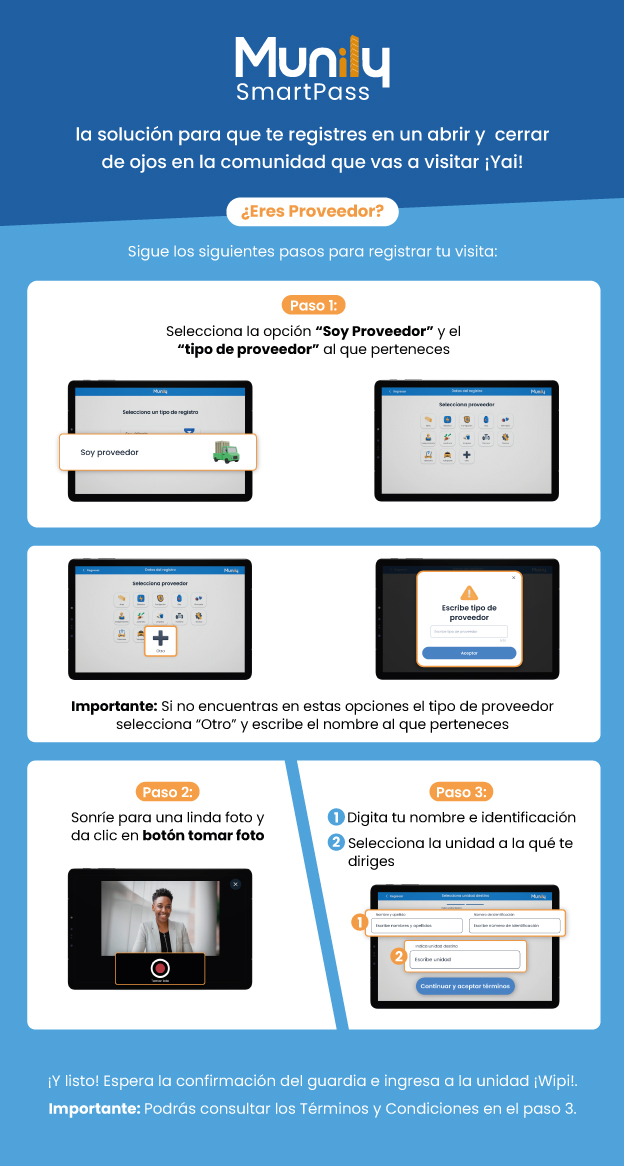
Select the option "I am a Proveedor".
Next, choose the "type of service provider" that applies to you.
- On the main screen, you’ll see the option "Select a registration type".
- Tap the option that says "I am a service provider", represented by a green truck icon.
- Next, a screen will appear with different icons representing service provider types. Select the one that corresponds to your service.
- Important: If you can’t find your service provider type among these options, select “Other” (represented by a plus sign inside a circle) and enter the name of your company or service.
Step 2:
- Smile for a nice photo and click the "Take Photo" button.
- You’ll see a screen with the camera view. Make sure you’re properly framed and smile.
- Press the large circular button in the center of the screen to take your photo.
Step 3:
Enter your name and ID number.
Select the unit you’re heading to.
- On the screen, you’ll find two fields:
- The first field is for entering your "First and Last Names".
- The second field is for entering your "ID Number".
- Below these fields, you’ll see a field labeled "Enter Unit". Here, you must select or type the number of the unit you’re heading to.
- Once you’ve filled in the information, tap the "Continue and Accept Terms" button.
- On the screen, you’ll find two fields:
And that’s it! Wait for confirmation from the security guard and enter the Wipi unit!
Important: You can review the Terms and Conditions in Step 3.
Guide images
Still need help? Reach us on WhatsApp or at soporte@munily.com.
Con Amor 💙 Munily