

Are you a visitor? Learn how to use SmartPass here🚀
Welcome to Munily SmartPass!
MunilySmartPassis the solution that lets you register in the blink of an eye with the community you’re visiting. Yay!
Are You a Visitor?
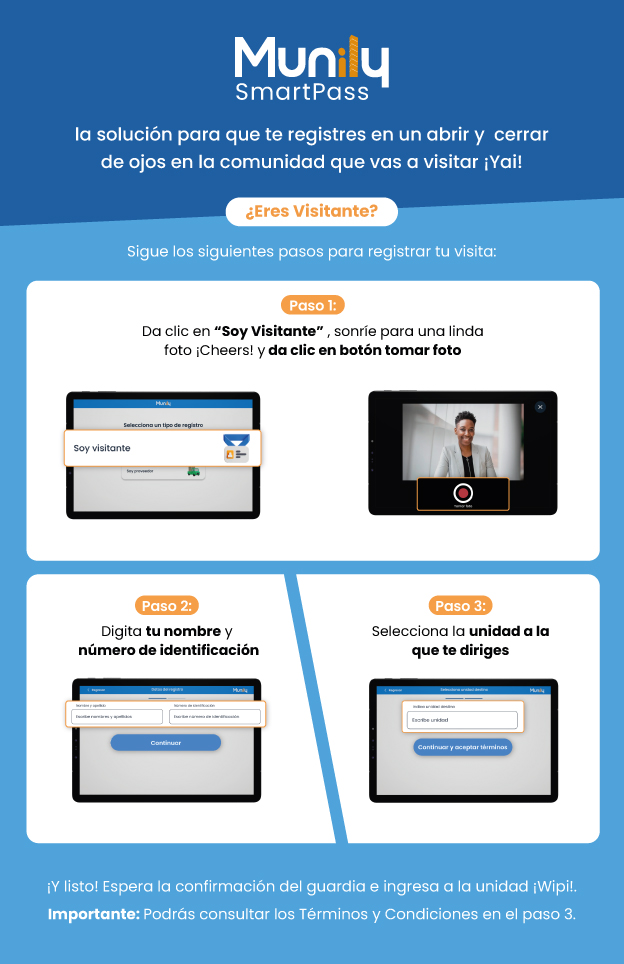
Follow these steps to register your visit:
Step 1:
- Click "I'm a Visitor".
- Smile for a nice photo. Cheers!
- Click the "Take Photo" button.
Step 2:
- Enter your name and ID number.
- On the screen, you’ll see two fields: “First and Last Name” and “ID Number.”
- Enter your information in the corresponding fields.
- Click the "Continue" button.
Step 3:
- Select the unit you’re heading to.
- On the screen, you’ll see a field to enter the unit.
- Enter the unit’s number or name.
- Click the "Continue and Accept Terms" button.
And that’s it! Wait for confirmation from the security guard and enter the unit. Wipi!
Important: You can review the Terms and Conditions in Step 3.
Guide images
Still need help? Reach us on WhatsApp or at soporte@munily.com.
Con Amor 💙 Munily