

Create and send mass announcements!
Here’s a step-by-step guide to creating and sending mass announcements to your residents:
Creating and Sending Announcements
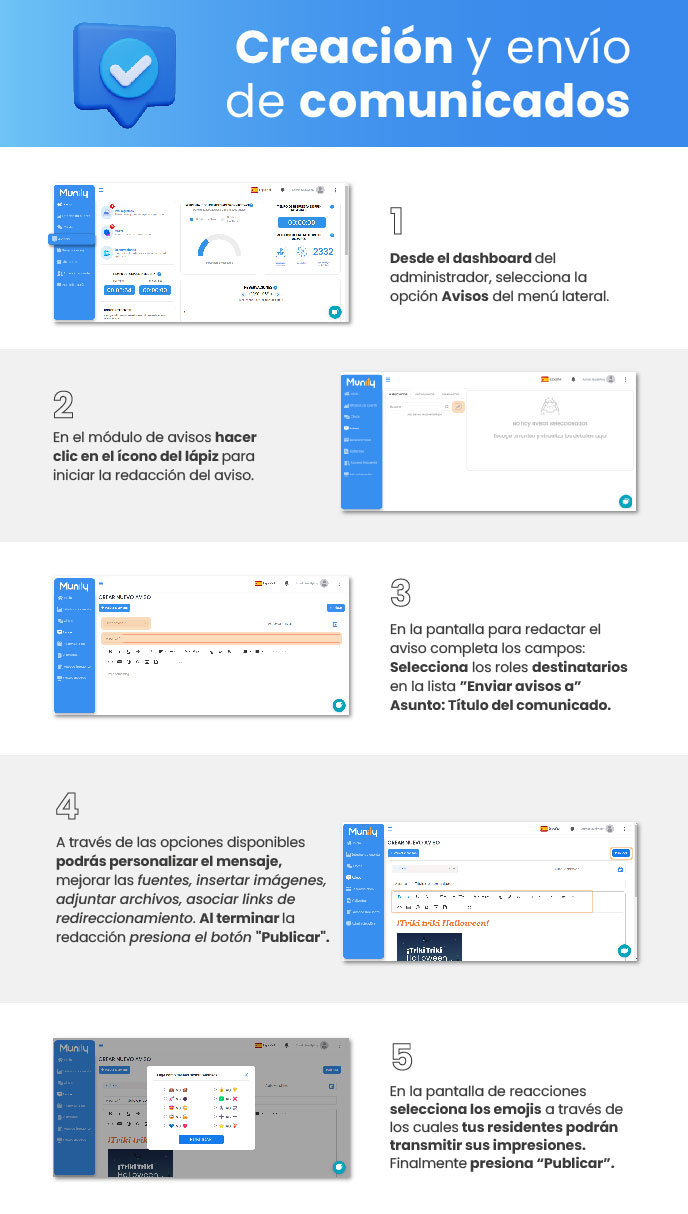
1. Access the “Avisos (Notices)” module from the Dashboard.
- From the administrator dashboard, select the Avisos option from the side menu.
2. Start drafting a new notice.
- In the notices module, click the pencil icon to start drafting the notice.
3. Fill out the notice fields.
- On the notice drafting screen, fill out the following fields:
- Select the recipient roles from the "Send notices to" list.
- Subject: Title of the announcement.
4. Customize and publish your announcement.
- Using the available options, you can customize the message, adjust the fonts, insert images, attach files, and include links.
- When you’re done drafting, click the "Publish" button.
5. Select emojis for reactions.
- On the reactions screen, select the emojis your residents can use to express their reactions.
- Finally, click "Publish".
Guide images
Still need help? Reach us on WhatsApp or at soporte@munily.com.
Con Amor 💙 Munily