

Do you want to delete your account?
How to Delete Your Account
If you want to delete your account on Munily, follow these steps:
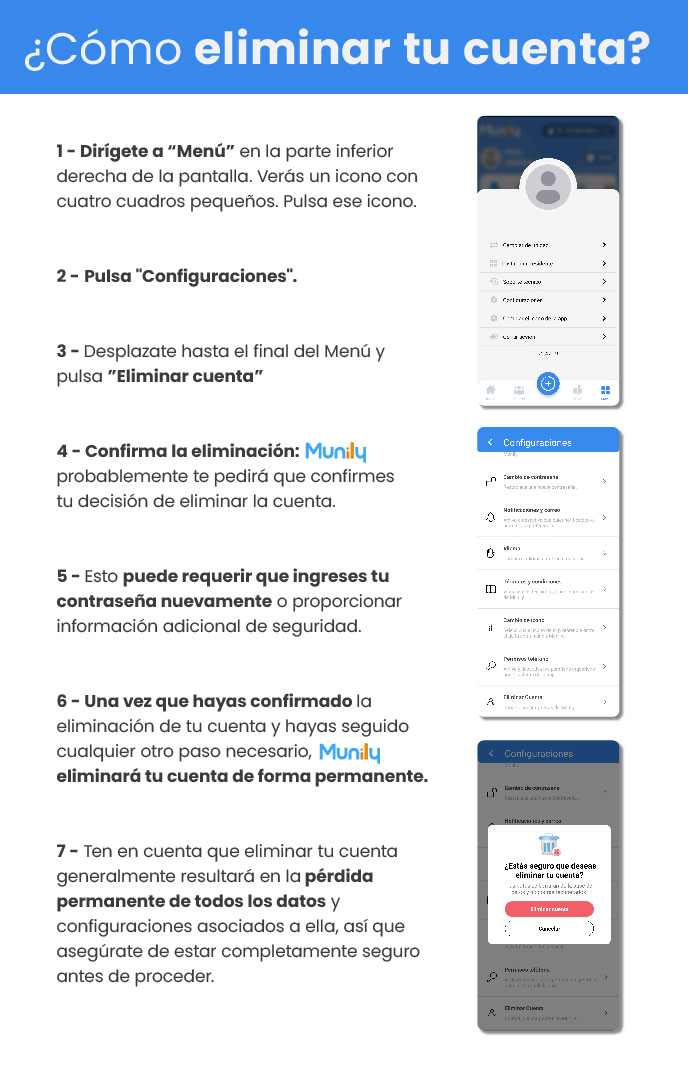
Go to "Menú (Menu)" in the lower-right corner of the screen. You'll see an icon with four small squares. Tap that icon.
Click "Configuraciones (Settings)".
Scroll to the bottom of the Menú and click "Delete Account".
Confirm the deletion: Munily will likely ask you to confirm your decision to delete the account.
This may require you to re-enter your password or provide additional security information.
Once you’ve confirmed the deletion of your account and completed any other necessary steps, Munily will permanently delete your account.
Please note that deleting your account will generally result in the permanent loss of all data and settings associated with it, so be sure you are completely certain before proceeding.
Guide images
Still need help? Reach us on WhatsApp or at soporte@munily.com.
Con Amor 💙 Munily