

Enable the "Auto registro" feature 📌
Here’s how to enable the “Auto registro (Self-Registration)” feature for your visitors:
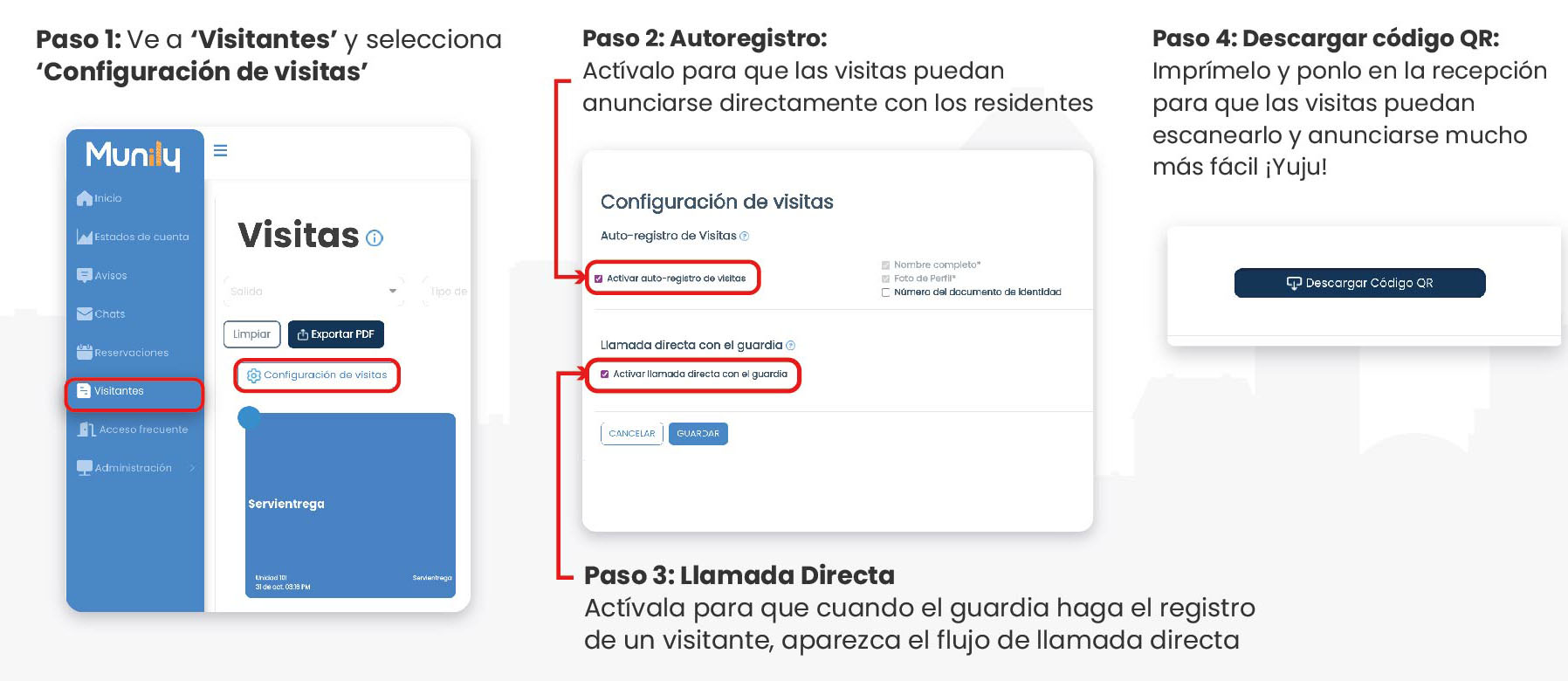
Step 1: Go to the “Visitantes (Visitors)” section
- In the left-hand sidebar, find and click the “Visitantes” option.
- Once inside the Visitantes section, locate and select Visitor Settings.
Step 2: Configure Self-Registration
- In the "Visitor Settings" section, you’ll find the Visitas (Visits) Self-Registration option.
- Check the box labeled Enable Self-Registration for Visitors.
- Next, you’ll see the option Direct Call to Security Guard. Check the box labeled Enable Direct Call to Security Guard if you want the security guard to receive a direct notification when a visitor checks in.
- Finally, click the SAVE button to apply the changes.
Step 3: Direct Call (Optional)
If you enabled the “Direct Call to Security Guard” option in the previous step, this feature will trigger a direct call workflow whenever a security guard checks in a visitor, allowing the guard to contact the resident.
Step 4: Download Your QR Code
- To make the process even easier, you can download a QR code. Click the Download QR Code button.
- Print this QR code and display it at the front desk of your building or residential community. Your visitors can scan it with their mobile devices to check in quickly and easily.
With these steps, your visitors will be able to check in independently and efficiently!
Video tutorial: https://www.youtube.com/watch?v=N1gmMOhcrKs
Guide images
Guide video
Still need help? Reach us on WhatsApp or at soporte@munily.com.
Con Amor 💙 Munily