

First-Time Vehicle License Plate Registration
Here’s how to register your license plate for the first time at Munily.
QPass: License Plates
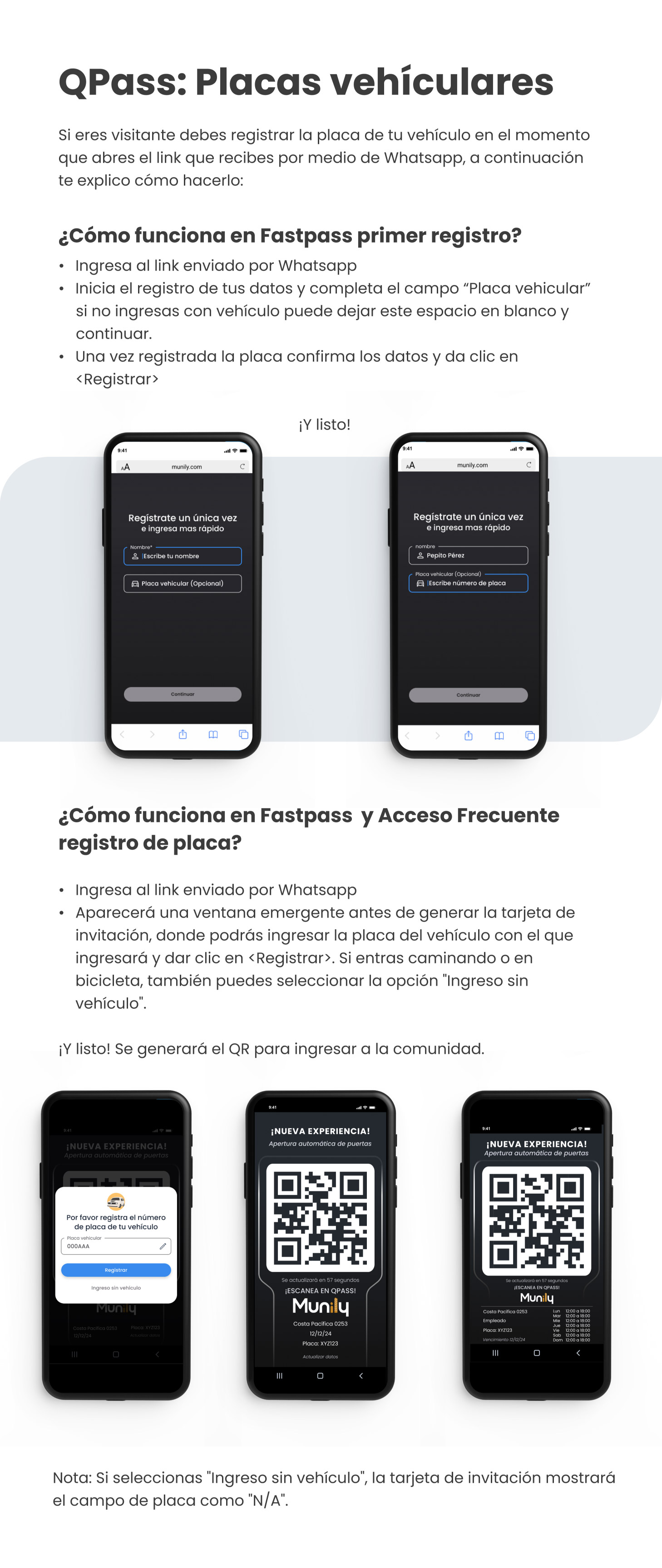
If you’re a visitor, you must register your license plate as soon as you open the link you receive via WhatsApp. Here’s how to do it:
How Does First-Time Registration Work on Fastpass?
- Click on the link sent via WhatsApp.
- Start entering your information and fill in the “License Plate” field. If you’re not entering with a vehicle, you can leave this field blank and continue.
- Once you’ve entered your license plate number, confirm the information and click
.
And that’s it!
Next, you’ll see the registration screen on your mobile device.
On the registration screen, you’ll find the following fields:
- Name*: Enter your name here.
- License Plate (Optional): In this field, you can enter your vehicle’s license plate number.
- Continue: Button to proceed to the next step.
After filling out the information and clicking “Continue,” your invitation card with a QR code will be generated.
How does license plate registration work on Fastpass and Acceso Frecuente (Frequent Access)?
- Go to the link sent via WhatsApp.
- A pop-up window will appear before the invitation card is generated, where you can enter the license plate of the vehicle you’ll be arriving in and click
. If you’re arriving on foot or by bike, you can also select the “Entry without a vehicle” option.
And that’s it! A QR code will be generated for entry into the community.
On your mobile device’s screen, you’ll see your invitation card with the QR code.
Note: If you select “Entry without a vehicle,” the invitation card will show the license plate field as “N/A.”
Guide images
Still need help? Reach us on WhatsApp or at soporte@munily.com.
Con Amor 💙 Munily