

How do I approve a user pre-registration?
To approve a pre-registration, follow these steps:
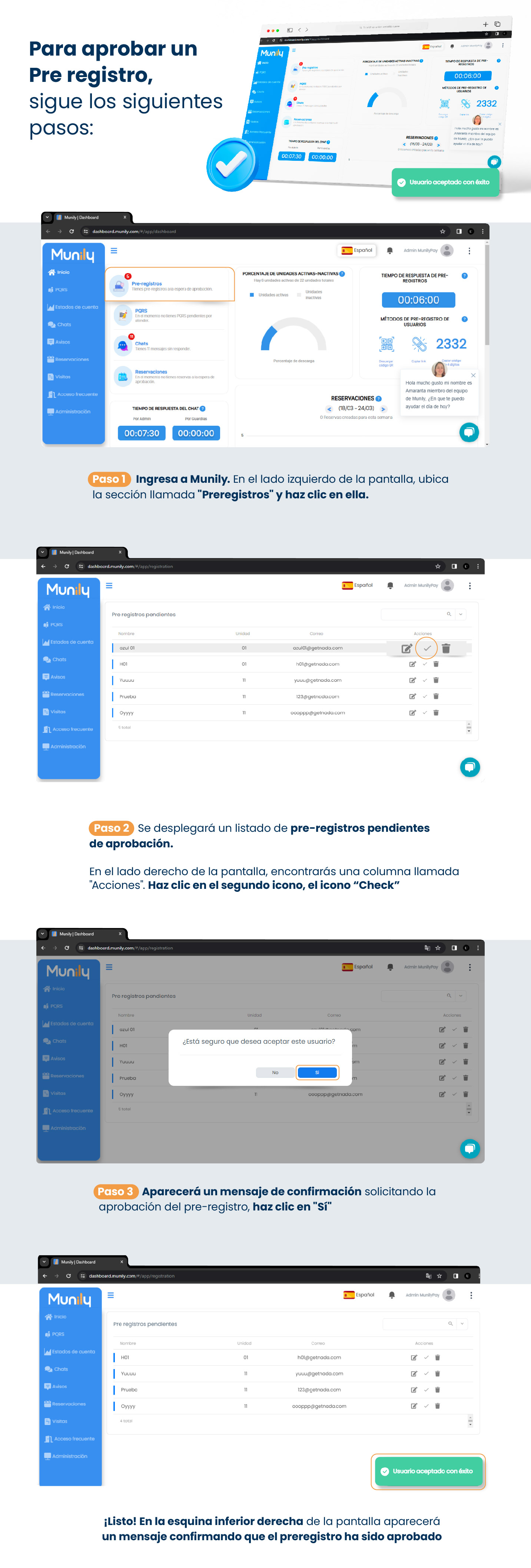
Step 1: Go to Munily.
On the left side of the screen, locate the section labeled “Pre-registros (Pre-registrations)” and click on it. You’ll see a “5” next to the “Pre-registros” icon, indicating that there are pre-registrations awaiting approval.
Step 2: A list of pre-registrations pending approval will appear.
On the right side of the screen, you’ll find a column labeled “Actions.” Click the second icon, the “Check” icon (a checkmark).
Step 3: A confirmation message will appear asking you to approve the pre-registration.
Click “Yes.”
That’s it! A message will appear in the lower-right corner of the screen confirming that the pre-registration has been approved.
Guide images
Still need help? Reach us on WhatsApp or at soporte@munily.com.
Con Amor 💙 Munily