

How do I cancel a visitor? 🧍🏻🏌🏻
How do I cancel an appointment?
It's easier than you think!
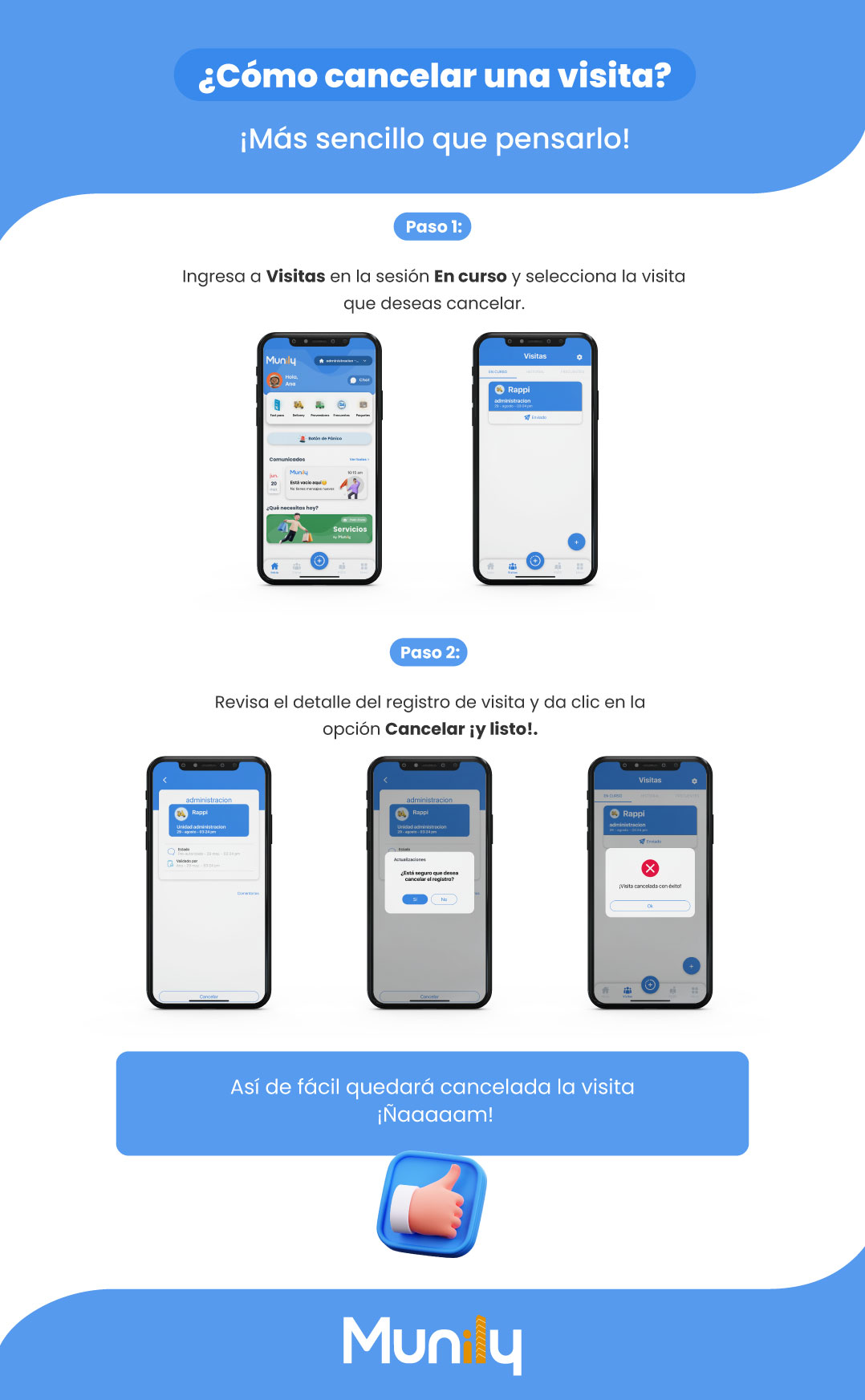
Follow these steps to cancel an appointment in the Munily app:
Step 1:
- Go to the Visitas (Visits) section.
- Select the En curso (In progress) tab.
- Choose the appointment you want to cancel.
(The screen shows three mobile phone views. The first shows the main screen of the Munily app with several options. The second shows the “Visitas” section with a visitor named “Rappi” in the “En curso” tab. The third shows the same visits section with the “Rappi” visitor selected.)
Step 2:
- Review the details of the visitor record.
- Click the Cancel option.
- A confirmation window will appear asking, “Are you sure you want to cancel the record?”
- Select Yes to confirm the cancellation.
(The screen shows three mobile phone views. The first shows the details of a selected visit. The second shows a confirmation pop-up window to cancel the visit. The third shows a confirmation message stating “Visit successfully canceled!” and an “OK” button.)
That’s how easy it is to cancel the visit! Yum!
(A thumbs-up symbol appears at the bottom of the screen to indicate approval.)
Guide images
Still need help? Reach us on WhatsApp or at soporte@munily.com.
Con Amor 💙 Munily