

How do I download a visitor log file?
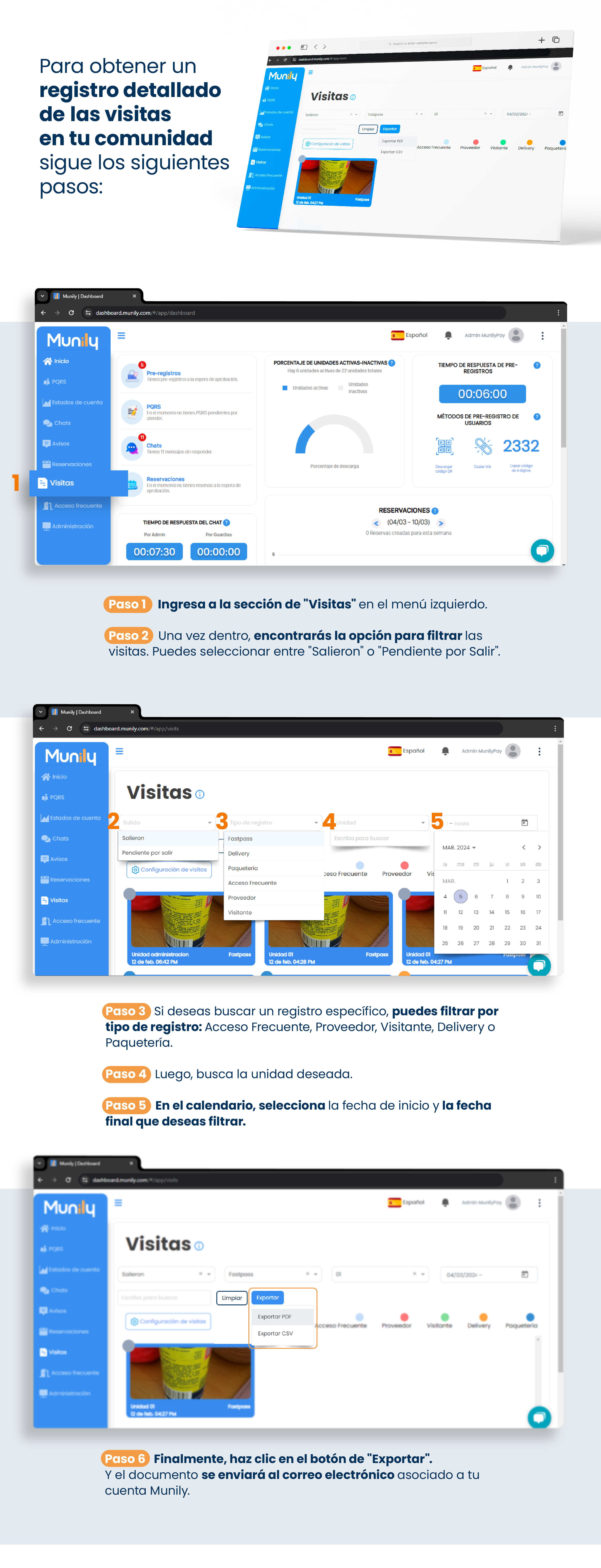
To get a detailed record of visitors to your community, follow these steps:
Step 1: Go to the "Visitas (Visits)" section in the left-hand menu.
Step 2: Once there, you’ll find the option to filter visitors. You can choose between "Completed" or "Pending".
Step 3: If you want to search for a specific record, you can filter by record type: Acceso Frecuente (Frequent Access), Proveedor (Service Provider), Visitor, Delivery (Delivery), or Packages.
Step 4: Next, search for the desired unit.
Step 5: On the calendar, select the start date and end date you want to filter by.
Step 6: Finally, click the "Export" button. The document will be sent to the email address associated with your Munily account.
When you click “Export,” a menu will appear with the options “Export PDF” and “Export CSV”. Select the format you prefer.
Guide images
Still need help? Reach us on WhatsApp or at soporte@munily.com.
Con Amor 💙 Munily