

How do I edit the status or characteristics of an area from the Dashboard?
Here’s how to edit the status or characteristics of an area from the Munily Dashboard:
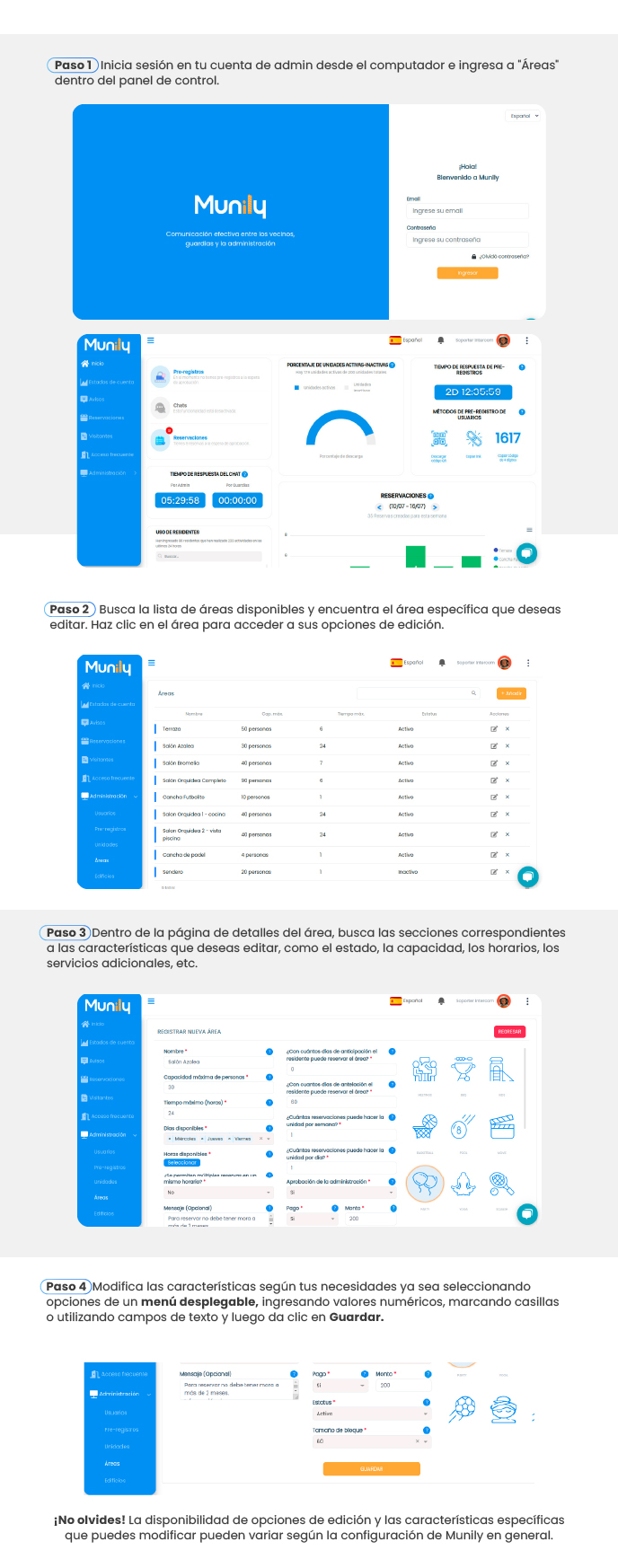
Step 1: Log in to your administrator account
- From your computer, log in to your administrator account at Munily.
- Once in the control panel, locate and click the "Áreas (Areas)" option in the left-hand side menu.
Step 2: Find and select the area you want to edit
- On the main screen, you’ll see a list of available areas.
- Locate the specific area you want to edit.
- Click on the area’s name to access its editing options.
Step 3: Navigate to the area’s details section
- On the area’s details page, you’ll find several sections.
- Look for the sections corresponding to the characteristics you want to modify, such as status, capacity, hours, or additional services.
Step 4: Modify the area’s characteristics
- Make the necessary changes according to your requirements. You can do this in the following ways:
- By selecting options from a drop-down menu.
- By entering numerical values in the corresponding fields.
- By checking checkboxes.
- By using text fields to enter information.
- Once you’ve made all the desired changes, click the “Save” button.
Don’t forget! The availability of editing options and the specific features you can modify may vary depending on the overall configuration of Munily for your residential community.
Guide images
Still need help? Reach us on WhatsApp or at soporte@munily.com.
Con Amor 💙 Munily