

How do I find the IMEI number?
To find the IMEI code on your tablet, follow these steps:
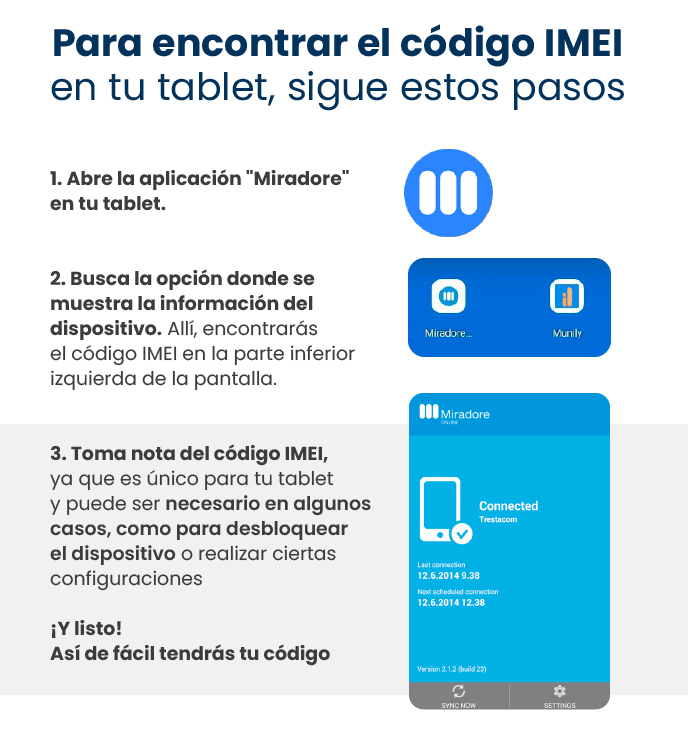
Open the "Miradore" app on your tablet.
- You'll see the "Miradore" app icon, which consists of three vertical bars inside a blue circle.
Look for the option that displays device information.
- There, you’ll find the IMEI code in the lower-left corner of the screen.
- On your tablet’s screen, you’ll see two icons: one labeled “Miradore...” and another labeled “Munily.” Select the “Miradore...” option.
- Next, the “Miradore” main screen will appear. In the lower-left corner of this screen, below the image of a mobile device, you’ll find the text “Connected Trestacom.” Just below this, you’ll see information about the last connection and the next scheduled connection. The IMEI code is located in this section.
Make a note of the IMEI code, as it is unique to your tablet and may be needed in some cases, such as to unlock the device or perform certain settings.
And that’s it! It’s that easy to get your code.
Guide images
Still need help? Reach us on WhatsApp or at soporte@munily.com.
Con Amor 💙 Munily