

How do I review Munily's announcements? 📄
Here's how to view announcements on Munily:
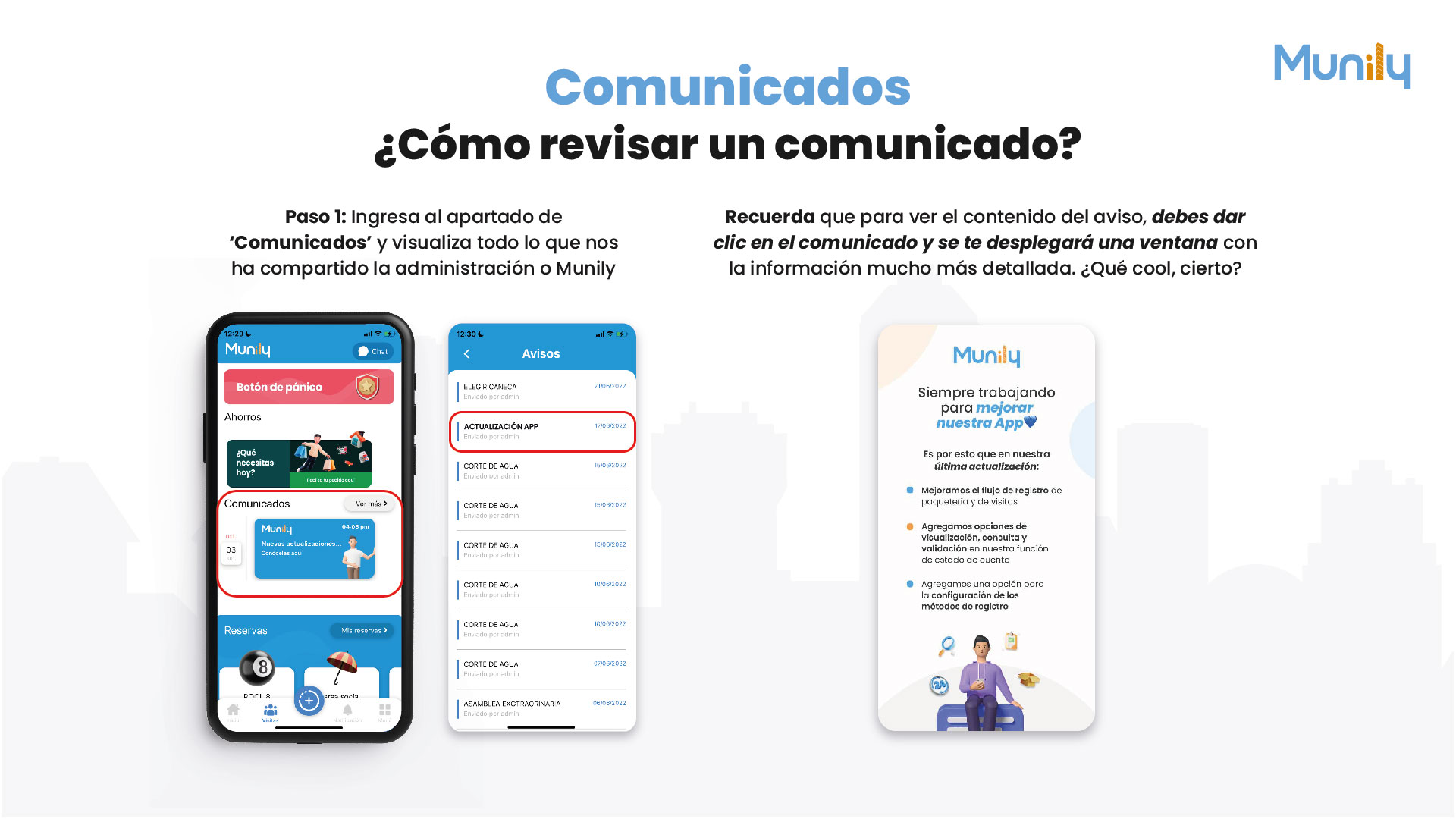
Step 1: Go to the "Comunicados (Announcements)" section and view everything the property management team or Munily has shared with us.
- On the app's main screen, look for the section called "Comunicados".
- You’ll see a summary of recent announcements. To view all notices, click the “See More” button located to the right of the “Comunicados” section.
How do I view the detailed content of an announcement?
Remember that to view the full content of the notice, you must click on the announcement, and a window with much more detailed information will open.
Example of how it would look in the app:
On your phone’s screen, you’ll see the Munily logo at the top. Below that, you’ll find different sections such as “Panic Button,” “Savings,” and “Comunicados.”
Within the “Comunicados” section, you’ll see a box titled “Munily” with the description “New updates… Learn more here.” This is an example of an announcement you can review.
When you click on this announcement, a new screen will open with the title “Avisos (Notices)”. On this screen, you’ll see a list of all sent announcements, along with their titles and dates. For example, you might see:
- CHOOSE COURT (Sent by admin) - 05/21/2022
- APP UPDATE (Sent by admin) - 05/17/2022
- WATER OUTAGE (Sent by admin) - 05/15/2022
- And so on.
Additional information about app updates:
On the right side of the screen, you’ll see a box with the Munily logo and the message “Always working to improve our app”. Here are the details of the latest updates:
- We’ve improved the workflow for tracking packages and visitor logs.
- We’ve added options for viewing, querying, and validating information in our account statement feature.
- We’ve added an option to configure tracking methods.
It’s that easy to stay up to date on all the latest news and important notices in your building or residential community with Munily!
Video tutorial: https://www.youtube.com/watch?v=bZWxuP9HDeA
Guide images
Guide video
Still need help? Reach us on WhatsApp or at soporte@munily.com.
Con Amor 💙 Munily