

How do I send invitations vi FastPass?
Here's how to send invitations using FastPass:
Step 1: Start by sending an invitation to FastPass
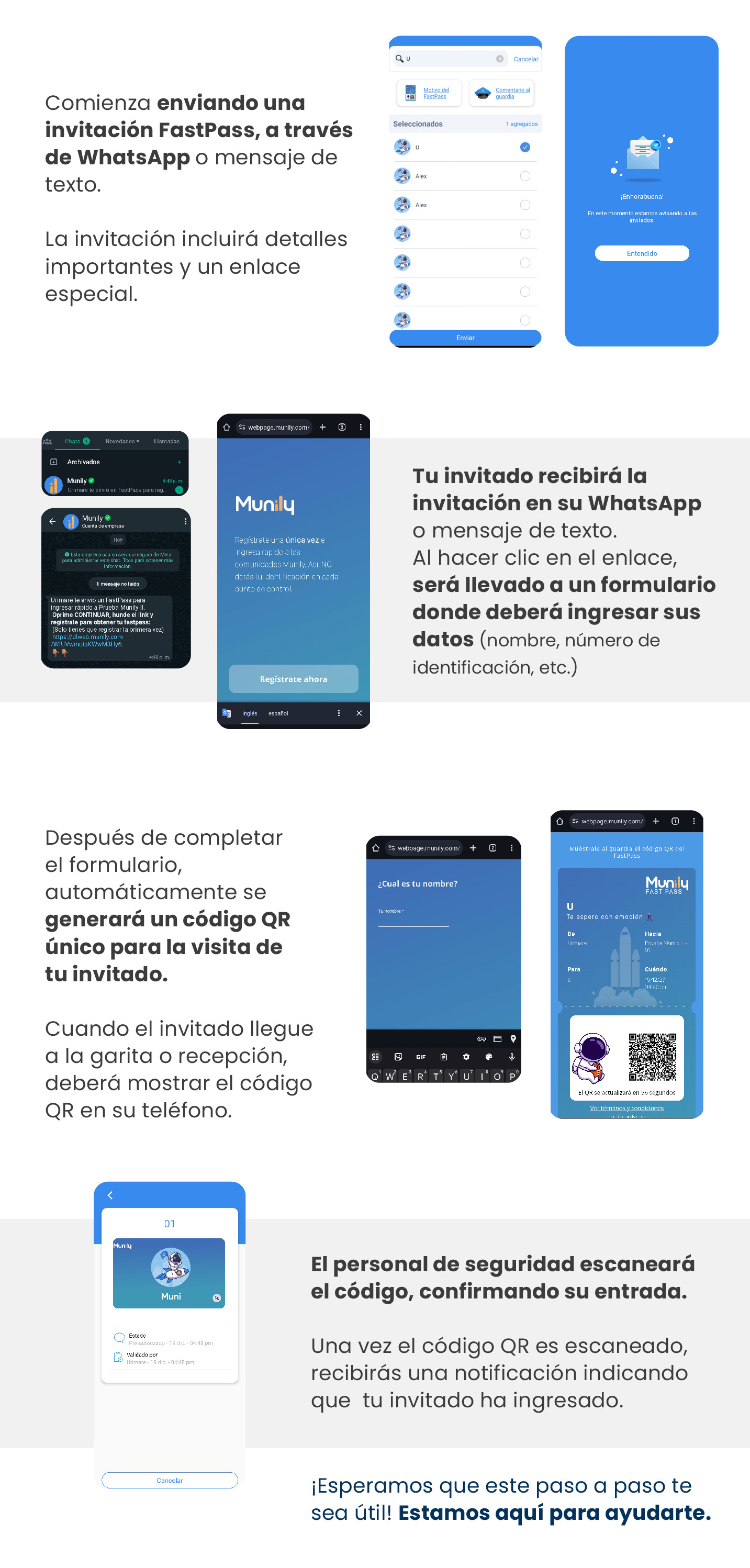
You can send the invitation via WhatsApp or as a text message. The invitation will include important details and a special link.
Step 2: Select your guests
On the selection screen, you’ll see a list of contacts. Tap the icon on the right to select the people you want to send the invitation to. You can also enter a reason for the FastPass and a comment for the security guards. Once you’ve selected your guests, tap the “Send” button at the bottom.
Step 3: Your guest will receive the invitation
Your guest will receive the invitation via WhatsApp or text message. When they click the link, they’ll be taken to a form where they’ll need to enter their information, such as their name and ID number.
Step 4: A QR code will be generated
After completing the form, a unique QR code will be automatically generated for your guest’s visitor experience.
Step 5: The guest presents the QR code
When your guest arrives at the gatehouse or reception desk, they must show the QR code on their phone.
Step 6: Security staff scan the code
Security staff will scan the QR code, thereby confirming your guest’s entry.
Step 7: Receive the entry notification
Once the QR code is scanned, you’ll receive a notification indicating that your guest has entered.
We hope you find this step-by-step guide helpful! We’re here to help.
Guide images
Still need help? Reach us on WhatsApp or at soporte@munily.com.
Con Amor 💙 Munily