

How do I update my account statements?
Dear Administrator,
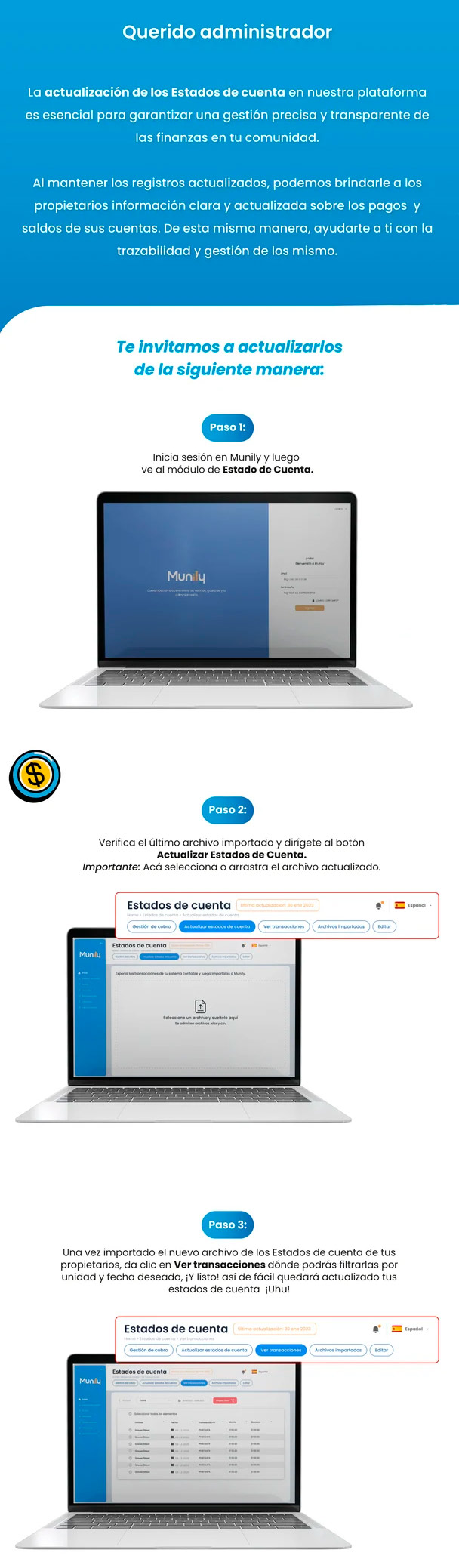
Updating the account statements on our platform is essential to ensuring accurate and transparent financial management in your community.
By keeping records up to date, we can provide homeowners with clear and current information about their account payments and balances. This also helps you track and manage these records.
We invite you to update them as follows:
Step 1:
Log in to Munily and then go to the Estado de Cuenta (Account Statement) module.
Step 2:
Verify the last imported file and click the Update Account Statements button. Important: Here, select or drag and drop the updated file.
Step 3:
Once the new file with your homeowners’ account statements has been imported, click View Transactions, where you can filter them by unit and date. And that’s it! It’s that easy to update your account statements. Yay!
Guide images
Still need help? Reach us on WhatsApp or at soporte@munily.com.
Con Amor 💙 Munily