

How do I update my Frecuentes access credentials?
Here's how to update your frequent access passes on Munily:
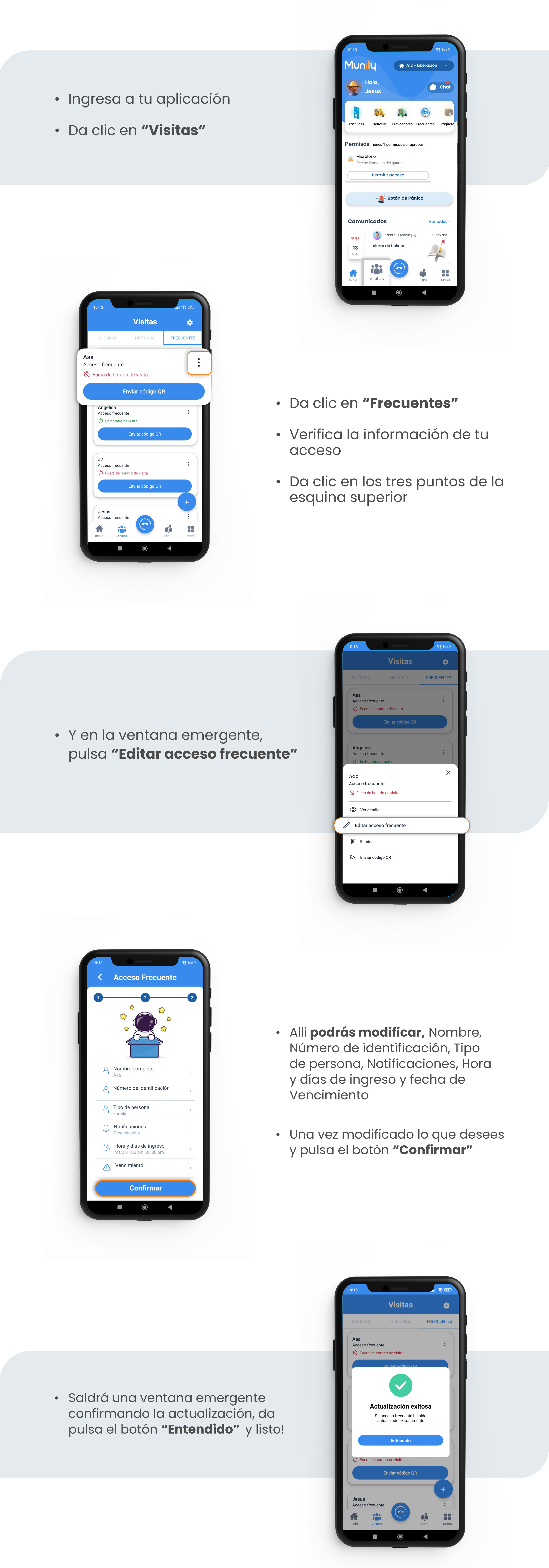
- Log in to your app and click "Visitas (Visits)".
- In the "Visits" section, select the "Frecuentes (Frequent)" tab.
- Verify your access pass information.
- Click the three dots in the upper-right corner of the access entry you want to modify.
- In the pop-up window, tap "Edit Frequent Access Pass".
- There, you can modify: Name, ID Number, Person Type, Notifications, Entry Times and Days, and Expiration Date.
- Once you’ve made the desired changes, click the "Confirm" button.
- A pop-up window will appear confirming the update. Click the "Understood" button, and you’re done.
Guide images
Still need help? Reach us on WhatsApp or at soporte@munily.com.
Con Amor 💙 Munily