

How do I use Botón de Pánico? 🚨
We care about you and the safety of your loved ones!
Is there smoke in your home? Has something happened to you and you have no one to help? Is there a situation that puts your community at risk?
At Munily, we’ve created a feature that lets you report any type of emergency with just a couple of clicks from the app.
Here’s how:
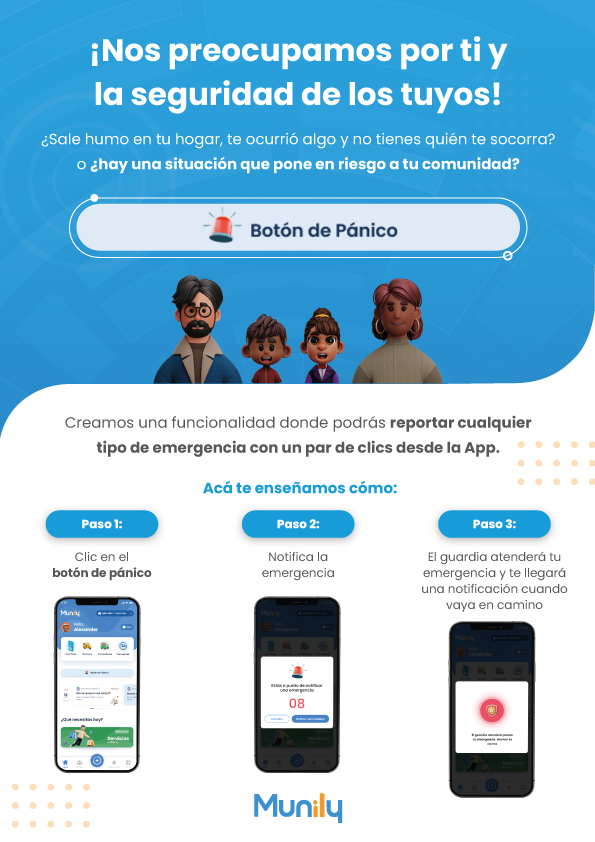
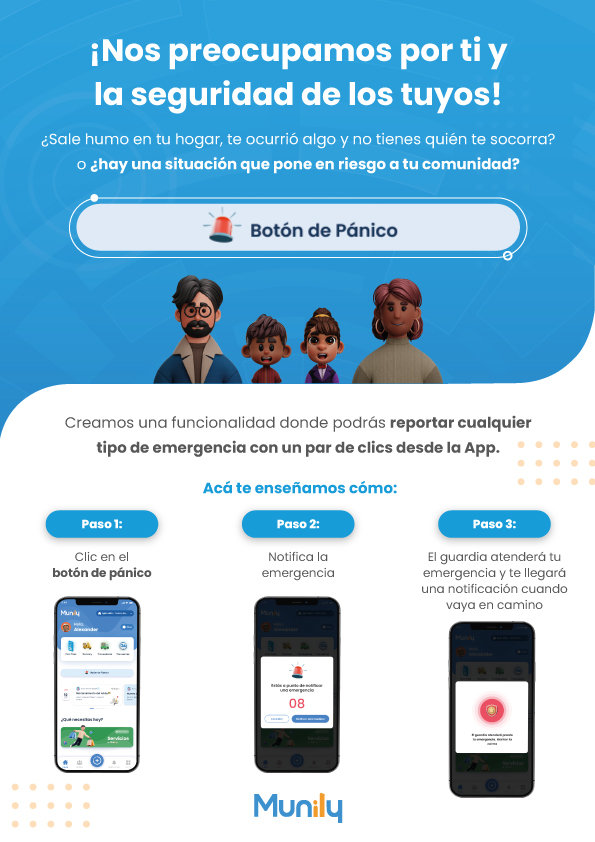
Step 1: Tap the panic button
- On the app’s main screen, you’ll see a prominent button with an alarm icon and the text “Botón de Pánico (Panic Button).” Tap it.
Step 2: Report the emergency
- When you press the panic button, a screen will open where you can confirm that you want to report an emergency. You’ll see a message stating “You are about to report an emergency” and a large number (in the example, “08”) representing the response or confirmation time.
- Tap the “Activate Alert” button to proceed.
Step 3: The security guard will respond to your emergency, and you’ll receive a notification when they’re on their way
- Once the alert is activated, the security guard will be notified.
- You’ll receive a notification on your mobile device indicating that the security guard is on their way to respond to your emergency. Your phone screen will display a shield icon with a red circle and the message “The security guard is on the way to the emergency—they’re on their way!”
With these simple steps, you can quickly and safely report any emergency through the Munily app.
Guide images
Still need help? Reach us on WhatsApp or at soporte@munily.com.
Con Amor 💙 Munily