

How do you check your internet speed on your tablet?
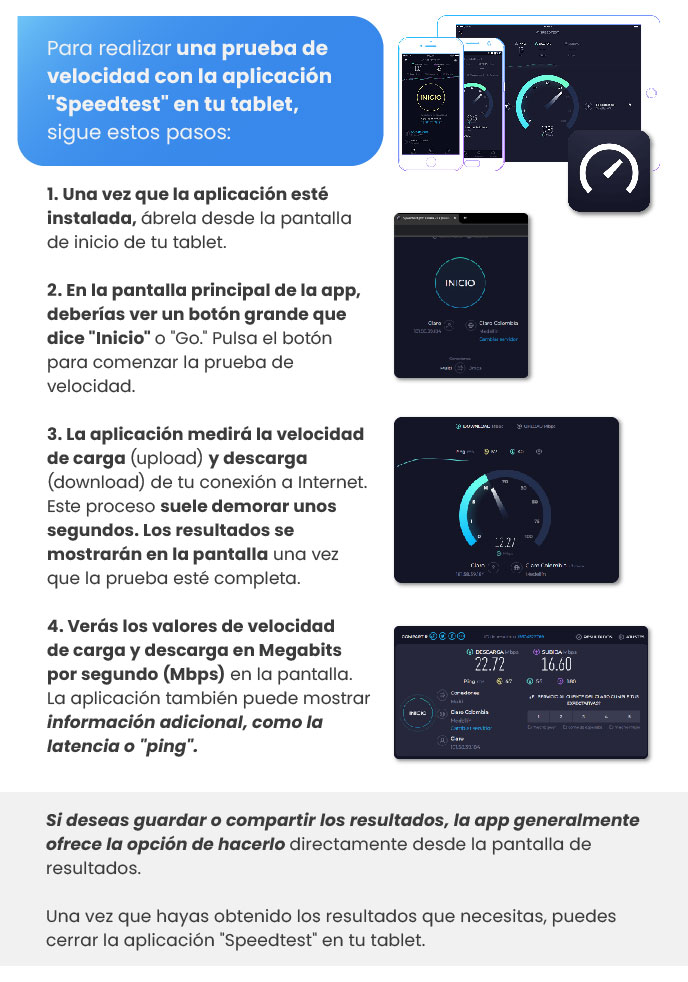
To run a speed test using the "Speedtest" app on your tablet, follow these steps:
Install and open the app: Once the app is installed, open it from your tablet's home screen.
Start the test: On the app’s main screen, you should see a large button that says “Inicio (Home)” or “Go.” Tap this button to start the speed test.
Wait for the app to measure your speed: The app will measure the upload and download speeds of your Internet connection. This process usually takes a few seconds. The results will be displayed on the screen once the test is complete.
Check the results: You’ll see the upload and download speeds in megabits per second (Mbps) on the screen. The app may also display additional information, such as latency or “ping.”
If you want to save or share the results, the app usually offers the option to do so directly from the results screen.
Once you’ve obtained the results you need, you can close the “Speedtest” app on your tablet.
Guide images
Still need help? Reach us on WhatsApp or at soporte@munily.com.
Con Amor 💙 Munily