

How do you contact a resident through the Virtu Citofonía? 📲
Welcome to the Virtual Citofonía (Virtual Intercom)!
Use this tool to easily communicate with people in your community.
Steps to contact a resident:
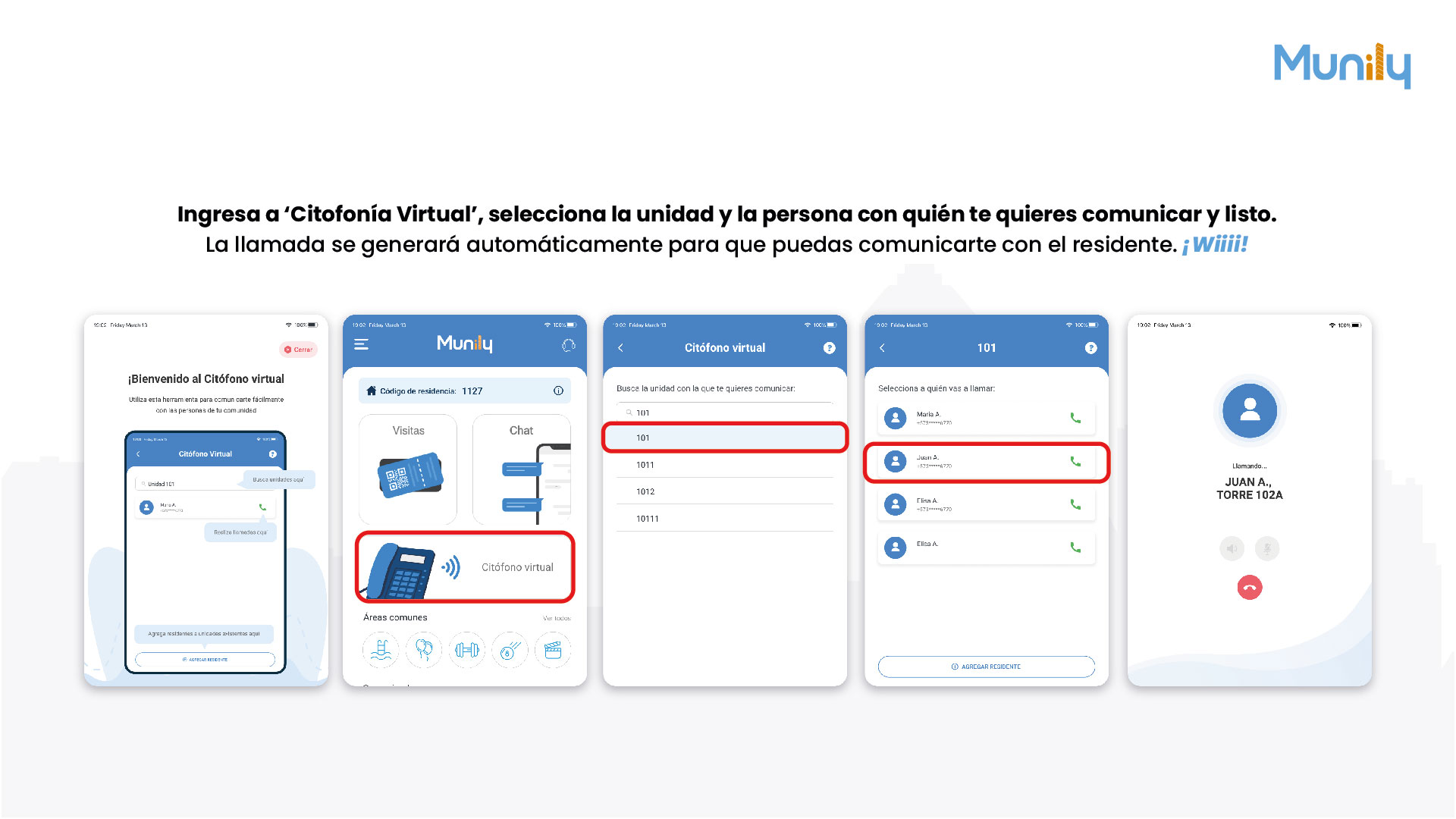
Go to 'Virtual Citofonía':
- On the main screen of Munily, find and select the Citófono virtual (Virtual Intercom) option. You’ll see an icon of a landline phone with communication waves.
Select the unit you want to contact:
- Once inside Virtual Citofonía, you’ll see a search field. Enter the unit number (e.g., “101”).
- A list of available units will appear. Select the desired unit. In the example, unit 101 is selected.
Choose the person you want to call:
- After selecting the unit, a list of residents associated with that unit will appear.
- Select the name of the resident you want to contact. In the example, Juan A. from Tower 102A is selected.
Done! The call will be placed automatically:
- When you select the resident, the app will automatically place the call.
- You’ll see a screen that says “Calling...” along with the resident’s name and unit number.
Yay! You can now talk to the resident.
Video tutorial: https://www.youtube.com/watch?v=L2XUEpgZwHY
Guide images
Guide video
Still need help? Reach us on WhatsApp or at soporte@munily.com.
Con Amor 💙 Munily