

How do you turn on "Citofonía" on your unit? 📲
Munily is your new virtual intercom!
To receive calls and manage everything in just a few clicks, follow these steps:
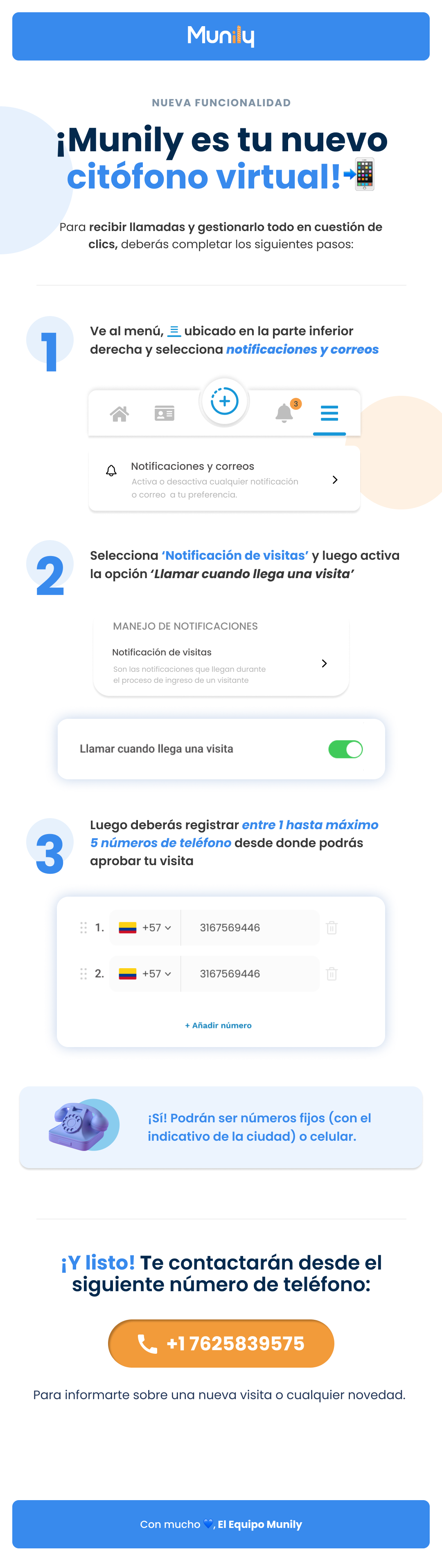
1. Set up your notifications:
- Go to the menu, represented by three horizontal lines (☰), located at the bottom right of your screen.
- Select the Notifications and Emails option.
- In this section, you can enable or disable any notifications or emails according to your preferences.
2. Enable visitor notifications:
- Select Visitor Notifications.
- Then, enable the Call When a Visitor Arrives option.
- Visitor notifications are the ones you receive during a visitor’s check-in process.
3. Register your phone numbers:
- You must register between 1 and a maximum of 5 phone numbers from which you can approve a visitor.
- On the screen, you’ll see a list where you can add the numbers. Each entry displays a phone number and a trash can icon to delete it.
- To add a new number, click + Add Number.
- These can be landline numbers (with the area code) or cell phone numbers.
And that’s it! You’ll be contacted from the following phone number: +1 7625839575.
To let you know about a new visitor or any updates.
With lots of ❤️, The Munily Team
Guide images
Still need help? Reach us on WhatsApp or at soporte@munily.com.
Con Amor 💙 Munily