

How does "Reserva de áreas" work?
Here’s how to make a reservation for spaces at Munily.
Áreas (Areas) Reservations
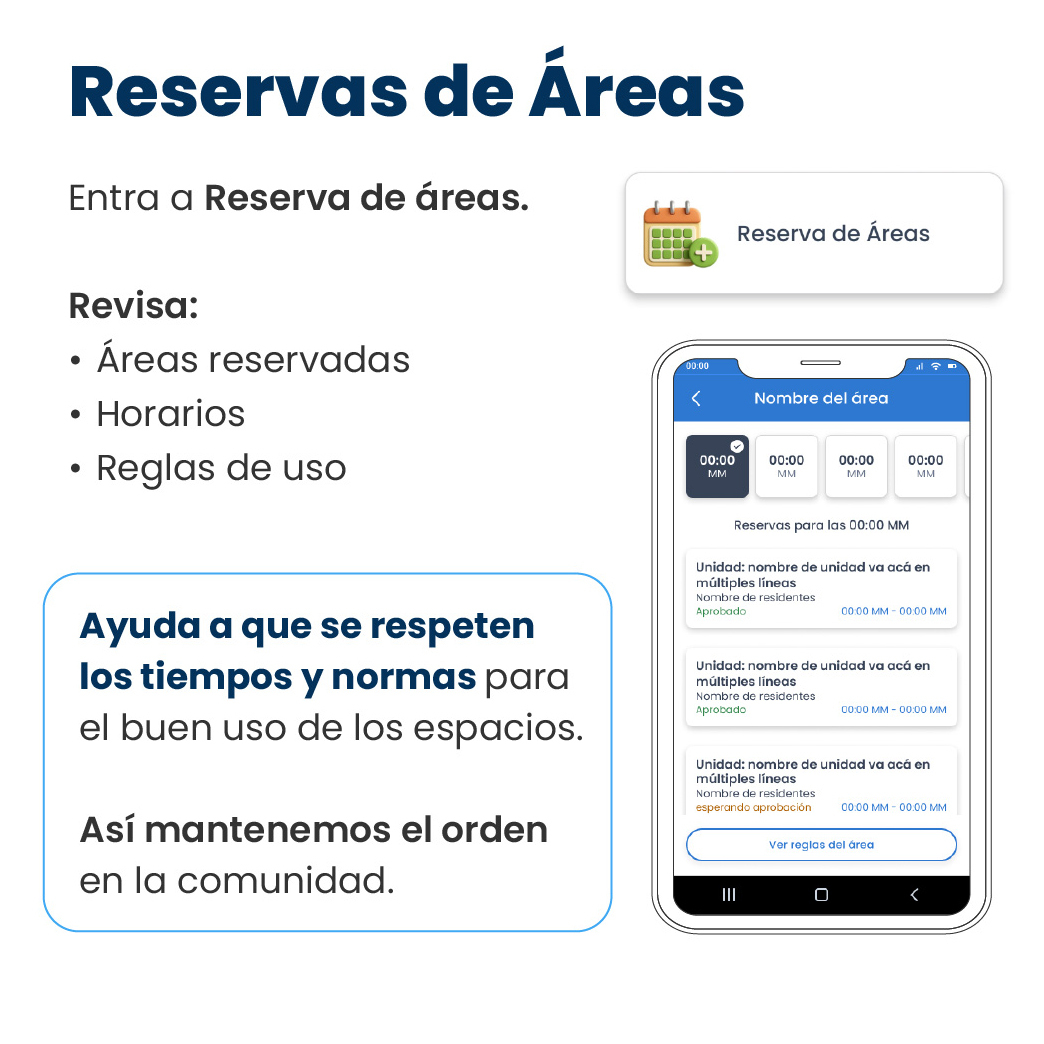
Go to "Reserva de áreas (Amenity Reservations)".
Check:
- Reserved Áreas
- Schedules
- Rules of use
Help ensure that time slots and rules for the proper use of spaces are followed.
This is how we maintain order in the community.
How to use the "Áreas" reservation feature:
- Access the feature: Search for and select the "Áreas Reservation" option. You’ll see a calendar icon with a green plus sign.
- View reservations: In the "Áreas Reservation" section, you’ll be able to see existing reservations.
- At the top of the mobile screen, you’ll see the name of the area you’re viewing.
- Below that, you’ll find buttons to filter reservations by time (e.g., 12:00 AM).
- Further down, the “Reservations for 12:00 AM” are listed. Each reservation shows:
- Unit: The name of the unit that made the reservation.
- Residents’ Names: The names of the residents associated with the unit.
- Reservation Status: This can be “Approved” or “Pending Approval.”
- Reservation Time: The time range of the reservation (e.g., 12:00 AM – 12:00 AM).
- Check the rules of use: To view the specific rules for each area, click the "View area rules" button.
By using this feature, you help ensure the proper use of common areas and maintain order in the community.
Guide images
Still need help? Reach us on WhatsApp or at soporte@munily.com.
Con Amor 💙 Munily