

How to Use the Panic Button in an Emergency? 🚨
Here's how to use the Botón de Pánico (Panic Button) app at Munily to report emergencies:
Panic Button
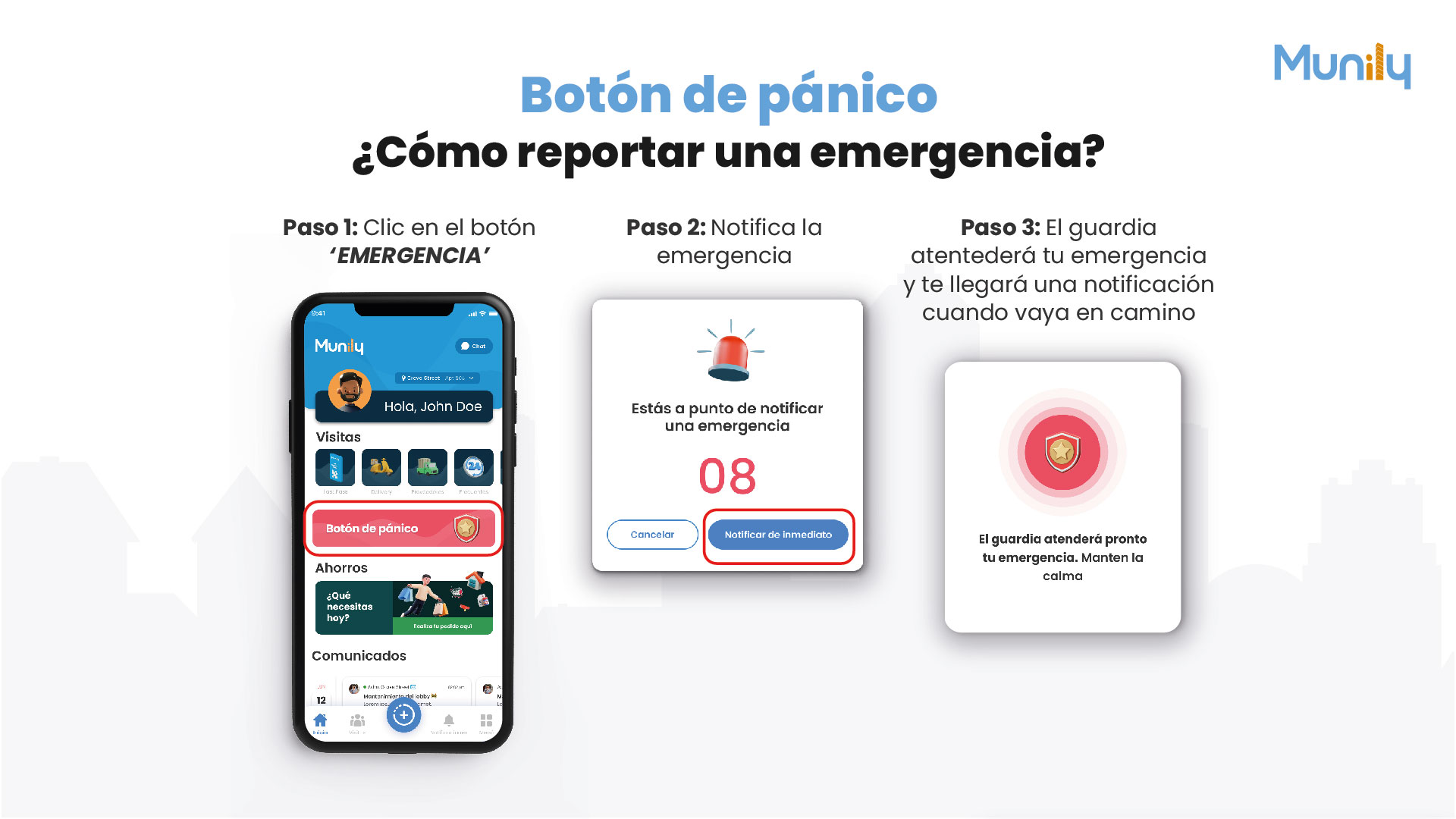
How to Report an Emergency
Step 1: Click the 'EMERGENCIA (EMERGENCY)' button
On the main screen of the Munily app, find and select the red button with the shield that says “Panic Button.”
Step 2: Report the emergency
When you press the panic button, a confirmation screen will appear. You’ll see a timer and two options:
- Cancel: If you change your mind or pressed the button by mistake, you can tap “Cancel.”
- Report Immediately: If the emergency is real, tap this button to send the alert.
Step 3: The security guard will respond to your emergency, and you’ll receive a notification when they’re on their way
Once you’ve reported the emergency, the security guard will be alerted. You’ll receive a notification on your mobile device indicating that the guard is on their way to address your situation. Stay calm while you wait for them to arrive.
Video tutorial: https://www.youtube.com/watch?v=UDa4HoF0DA8
Guide images
Guide video
Still need help? Reach us on WhatsApp or at soporte@munily.com.
Con Amor 💙 Munily