

Order some takeout! 🍿
Here’s how to easily schedule a delivery using the Munily app.
How do I schedule a delivery?
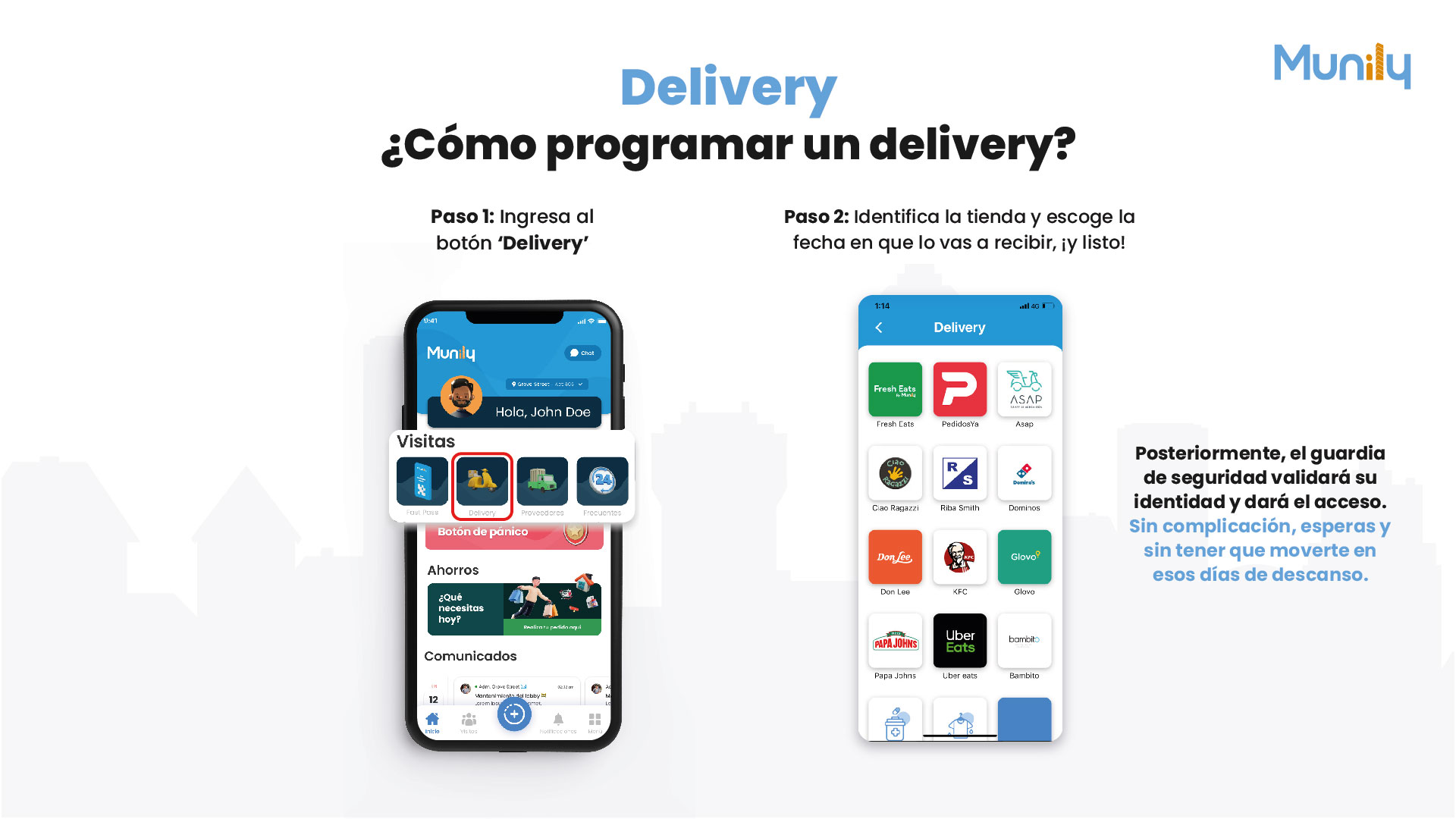
Step 1: Tap the “Delivery (Delivery)” button
On the main screen of the Munily app, look for the “Visitas (Visits)” section. Within this section, you’ll find several icons. Select the icon that says “Delivery”. This icon features an image of a yellow scooter.
Step 2: Select the store and choose the date you’d like to receive your order—and you’re all set!
Once you’ve tapped the “Delivery” button, a new screen will open with a list of stores available for your delivery order. You’ll see logos for different establishments such as:
- Fresh Eats
- PedidoYa
- Asap
- Ciao Ragazzi
- Riba Smith
- Dominos
- Don Lee
- KFC
- Glovo
- Papa Johns
- Uber Eats
- Bambito
Select the restaurant of your choice. After choosing the restaurant, the app will guide you through selecting the date you’d like to receive your order.
The security guard will then verify your identity and grant you access.
It’s hassle-free—just wait without having to leave the house on your days off.
Guide images
Still need help? Reach us on WhatsApp or at soporte@munily.com.
Con Amor 💙 Munily