

What is "Qpass" and how can you use it in your community? 🏡❗
Welcome to the Munily Help Center! Here, we explain how QPass works—our system for automatically opening doors and gates using QR codes.
How does it work?
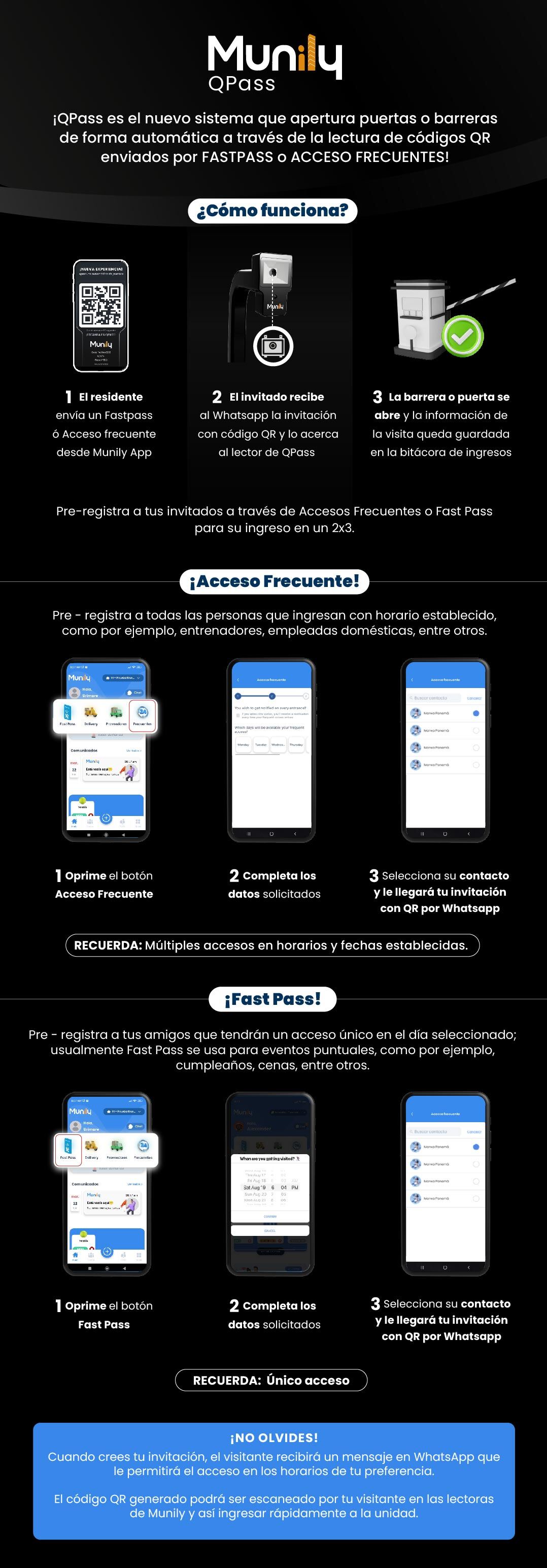
QPassis an innovative solution that lets you manage your guests’ access quickly and securely. The process is simple and consists of three steps:
- The resident: Sends a “Fastpass” or “Acceso Frecuente (Frequent Access)” from the Munily app.
- The guest: Receives the invitation with a QR code on WhatsApp and scans it at the QPass reader.
- The gate or door: Opens automatically, and the visitor’s information is logged in the entry log.
You can perform pre-registration for your guests via “Frecuentes (Frequent) Access” or “Fast Pass” to facilitate their entry in a 2x3.
Acceso Frecuente!
This system allows you to perform pre-registration for anyone who enters at a set time, such as trainers, housekeepers, and others.
Follow these steps to set up a Acceso Frecuente:
- Tap the “Acceso Frecuente” button on the main screen of the Munily app. You’ll see an icon with two people and a clock.
- Fill in the requested information. On this screen, you can set notification preferences and the days on which your guest will have a frequent access pass.
- Select their contact from your address book. Once selected, your guest will receive the invitation with the QR code via WhatsApp.
REMEMBER: With “Acceso Frecuente,” you can set up multiple accesses for specific times and dates.
Fast Pass!
With “Fast Pass,” you can perform pre-registration for your friends, who will receive a one-time access pass on the selected day. This system is commonly used for one-time events, such as birthdays, dinners, and more.
To create a “Fast Pass,” follow these steps:
- Tap the “Fast Pass” button on the main screen of the Munily app. You’ll see an icon with a car.
- Fill in the requested information. Here you can select the date and time your guest will have access.
- Select their contact from your address book. Your guest will receive the invitation with the QR code via WhatsApp.
REMEMBER: “Fast Pass” provides one-time access.
DON’T FORGET!
When you create your invitation, the visitor will receive a message on WhatsApp granting them access during the times you specify. The generated QR code can be scanned by your visitor at the Munily scanners, allowing them to enter the unit quickly.
Guide images
Still need help? Reach us on WhatsApp or at soporte@munily.com.
Con Amor 💙 Munily