

Do you know your PH code?
How do I find out the code for my PH (HOA)?
Here are the step-by-step instructions for obtaining the code for your homeowners association (HOA) (PH):
Option 1
Ask the PH administrator or the gatehouse staff for the code.
Option 2
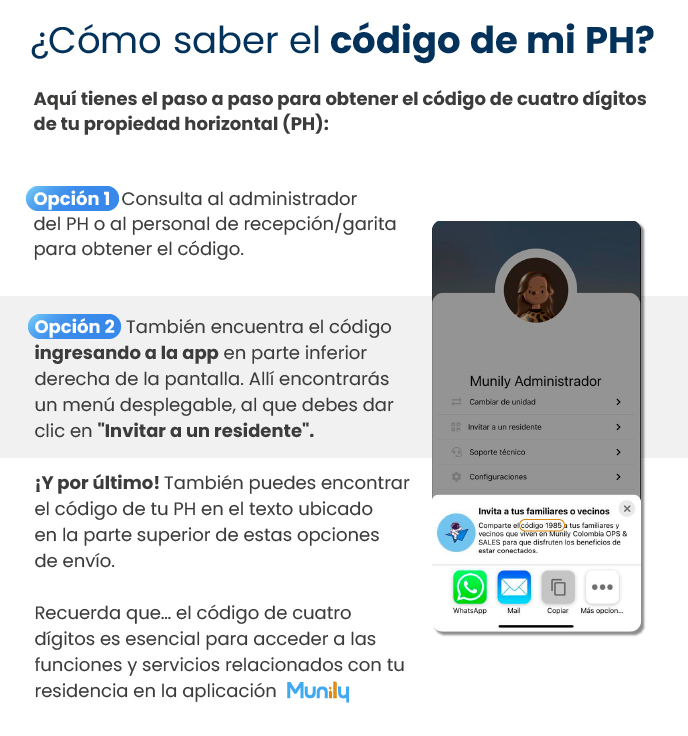
You can also find the code by opening the app and tapping the bottom-right corner of the screen. There you’ll see a drop-down menu; tap “Invite a Resident.”
On the app screen, you’ll see the heading “Munilyr Administrator.” Below this, you’ll find the following options:
- Change unit
- Invite a resident
- Technical support
- Configuraciones (Settings)
Select the “Invite a resident” option.
When you click “Invite a Resident,” a pop-up window will appear with the title “Invite Your Family Members or Neighbors.” Inside this window, you’ll find the following text:
"Share the code 1985 with your family members and neighbors who live at Munily Colombia OPS & SALES so they can enjoy the benefits of being connected."
Below this text, you’ll see the options for sharing the code:
- Copy
- More options...
And finally!
You can also find your PH code in the text located at the top of these sharing options.
Remember that... the four-digit code is essential for accessing the features and services related to your residence in the Munily app.
Guide images
Still need help? Reach us on WhatsApp or at soporte@munily.com.
Con Amor 💙 Munily