

How can I track the calls made by the security guard?
The feature everyone’s been waiting for: Call History!
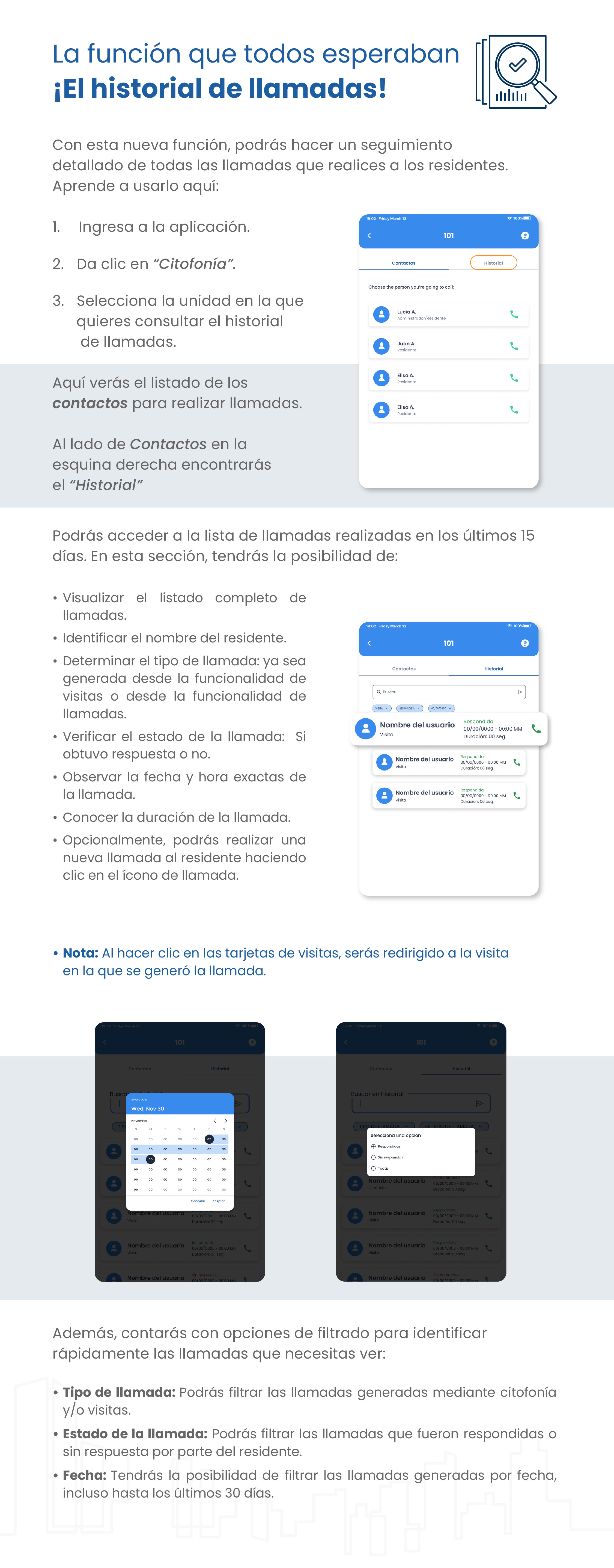
With this new feature, you’ll be able to keep detailed track of all the calls you make to residents. Learn how to use it here:
- Open the app.
- Click “Citofonía (Virtual Intercom).”
- Select the unit for which you want to view the call history.
Here you’ll see the list of contacts you can call.
Next to Contacts in the right-hand corner, you’ll find “Historial (History)”.
You can access the list of calls made in the last 15 days. In this section, you’ll be able to:
- View the complete list of calls.
- Identify the resident’s name.
- Determine the type of call: whether it was initiated through the visitor feature or the call feature.
- Check the call status: whether it was answered or not.
- View the exact date and time of the call.
- See the duration of the call.
- Optionally, you can make a new call to the resident by clicking the call icon.
Note: When you click on the visit cards, you’ll be redirected to the visit during which the call was made.
In addition, you’ll have filtering options to quickly identify the calls you need to view:
- Call Type: You can filter calls generated via virtual intercom and/or visits.
- Call Status: You can filter calls that were answered or went unanswered by the resident.
- Date: You can filter calls by date, including calls from the last 30 days.
Guide images
Still need help? Reach us on WhatsApp or at soporte@munily.com.
Con Amor 💙 Munily