

How do I change my profile picture?
Here's how to change your profile picture in the Munily app:
How to Change Your Profile Picture in the App
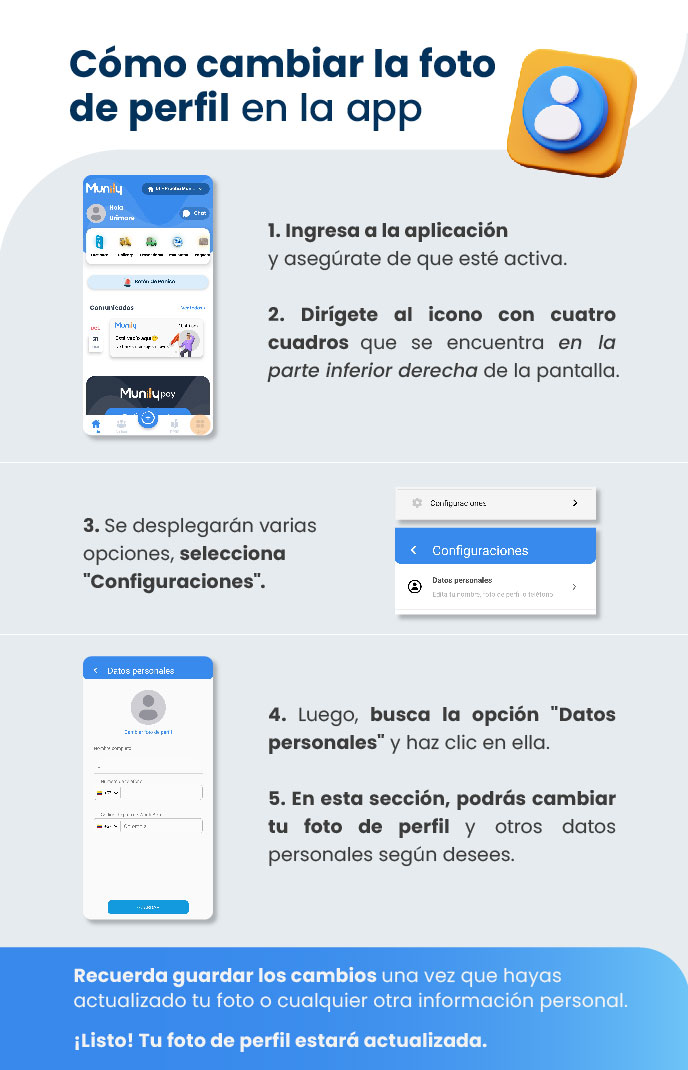
- Open the app and make sure it's running.
- Tap the icon with four squares located in the bottom-right corner of the screen.
- Several options will appear; select “Configuraciones (Settings)”.
- You’ll see a screen with the option “Configuraciones” and “Personal Information” below it.
- Next, look for the "Personal Information" option and click on it.
- A new screen titled "Personal Information" will open, where you can view your current information.
- In this section, you can change your profile picture and other personal information as desired.
Remember to save your changes once you’ve updated your photo or any other personal information.
That’s it! Your profile picture is now updated.
Guide images
Still need help? Reach us on WhatsApp or at soporte@munily.com.
Con Amor 💙 Munily